- What GX Control Actually Changes
- Open GX Control in 10 Seconds
- Opera GX RAM Limiter: Pick Your Cap
- Opera GX CPU Limiter
- Opera GX Network Limiter: Before a Big Download or a Ranked Match
- Hot Tabs Killer
- Opera GX Lag and High CPU Usage: Fixes in Order
- Settings Not Sticking?
- Opera GX Settings to Start From: Three Setups
- What We Couldn't Verify
- FAQ
Click the speedometer icon in Opera GX's left sidebar to open GX Control, switch on the Opera GX RAM limiter and drag the slider to a cap. Opera says the browser stays within it, and the same panel holds a CPU limiter and a network limiter. Last checked: October 17, 2026.
Get Opera GX free from Opera's site. GX Control is a desktop-browser feature on Opera's pages. Our links go to Opera's site through our tracker; if you'd rather, type opera.com yourself.
You alt-tab out of a match to look up a build guide, and the tab you forgot about is sitting on a few gigabytes of RAM. During alliance events mine is usually the spreadsheet tab I left open three screens ago. That moment is what this guide is built around.
I haven't used GX Control myself, and I haven't benchmarked it. These limiters cap the browser, not your game. Opera promises "less lag", but we found no independent test showing a frame-rate gain. Everything below comes from Opera's pages, Opera's forum and other sites' guides, linked where used, and anything that's our own suggestion is labeled.
What GX Control Actually Changes
Opera describes GX Control as a panel that monitors and limits memory, CPU and network use in real time so browser activity doesn't get in the way of gaming, streaming or multitasking. It has four parts:
- RAM limiter: Opera says you can "set hard limits or fine-tune exactly how much memory GX can use."
- CPU limiter: Opera says it will "throttle background tabs before they steal your performance."
- Network limiter: caps the bandwidth the browser uses. Opera's pitch: "keep downloads from wrecking your ping mid-match."
- Hot Tabs Killer: finds the heaviest tabs and closes them in one click.
Notice what's missing. Nothing on Opera's pages says GX Control touches your game's process, your GPU or the game's own downloads, and that's our reading of them. Opera's network limiter page calls it a way to control "your GX browser's bandwidth." If Steam is hogging your connection, or the game itself is what's eating your CPU, a browser limiter has nothing to say about it.
PCWorld's July 2025 piece says the effect is "hardly noticeable when surfing, but it makes a big difference when you're gaming," with no benchmarks or test method. Read that as one writer's impression. Whether the trade-offs are worth it (ad data, ownership, closed code) is covered in our Opera GX review.
Open GX Control in 10 Seconds
Not installed yet? Get Opera GX free from Opera's site, then:
- Click the speedometer icon in the left sidebar. Per Opera, that opens GX Control.
- No icon? Click the three-dot icon at the bottom of the sidebar and pick GX Control.
- No sidebar at all? How2Shout (July 2023) says to click Easy setup in the top-right corner and turn on Show sidebar.
- Scroll to the limiter you want and flip its toggle. SlashGear (2022) reports that the RAM and CPU limiters start switched off but still show current usage, a free look at who's eating what.
Opera GX RAM Limiter: Pick Your Cap
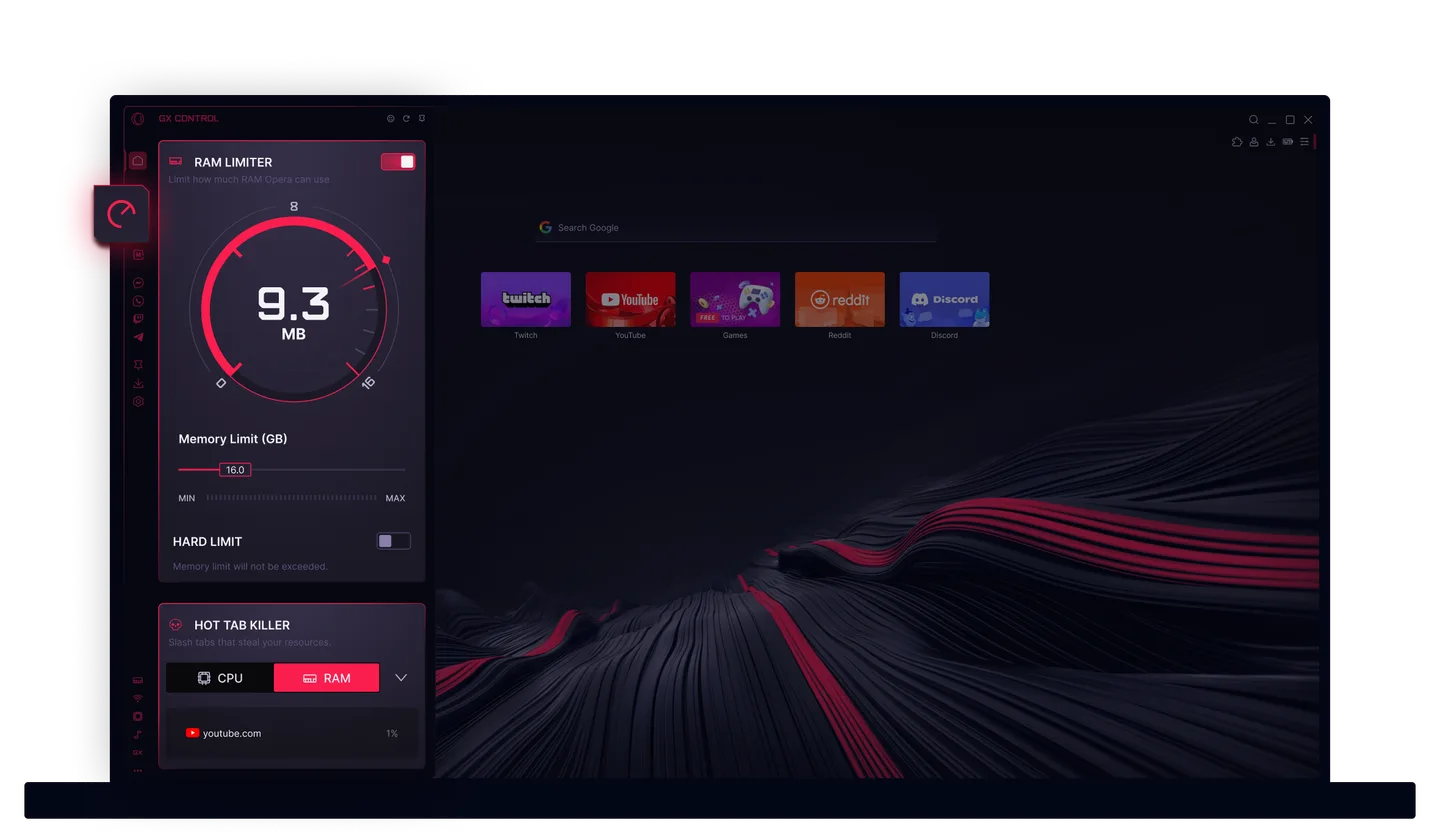
Do this first: move the slider on purpose. This is the step people skip, because flipping the toggle feels like finishing.
Nobody has published a measured "best number," so here's where the sources land:
- Opera's GX Control FAQ suggests that on a mid-tier system you limit GX to roughly 50 to 60% of available RAM.
- Make Tech Easier (July 2025) says to "at least set 25% of the total RAM," with 4GB on a 16GB system as its example.
- PCWorld (July 2025) suggests starting at 2 to 4GB and giving the browser no more than 4GB.
Opera's figure reads like a ceiling for a browser doing real work. The other two aim at leaving room for a game. So run two caps: a roomy one for everyday browsing, a tighter one for play.
| Total RAM | Opera's 50-60% | Make Tech Easier's 25% | Our starting cap while gaming (suggestion) |
|---|---|---|---|
| 8GB | 4 to 4.8GB | 2GB | 2 to 3GB |
| 16GB | 8 to 9.6GB | 4GB | 4GB |
| 32GB | 16 to 19.2GB | 8GB | 4 to 6GB |
Opera says "available" RAM; we used total RAM to keep the math simple. The percentage columns are our arithmetic on the sources' figures. On 32GB the sources pull apart: PCWorld stops at 4GB, Make Tech Easier's 25% gives 8GB, and 4 to 6GB is our judgment call between them.
Start there, open your usual tabs and see whether pages stay put. Tabs reloading constantly? Raise the cap a notch. Game still hitching? Lower it.
Slider steps differ by source and version: SlashGear (2022) reports 0.25GB, Make Tech Easier (2025) 0.50GB with a 1GB minimum, and How2Shout (2023) multiples of 256MB from 1GB. Trust the number on your screen.
Hard limit: when it breaks tabs
Under the slider sits a Hard limit toggle. Opera says to enable it "if you want GX to immediately drop non-active tabs from memory for maximum performance." SlashGear puts the difference plainly: without it the browser "will usually stay within the custom parameters," with it, it "never exceeds the limit."
The cost, per Make Tech Easier: the hard limit "might lead to more browser performance issues." Dropped tabs have to reload when you click back. Fine for a forum page, miserable for a Twitch stream or a half-written note.
Our suggestion is to leave it off. If the game still hitches with a sensible cap, flip it on for that session, on any machine including an 8GB laptop, and only if you don't mind tabs reloading. Skip the combination of a very low cap and the hard limit, which is the likeliest way to stare at a page that keeps rebuilding itself.
Opera GX CPU Limiter
Same drill: toggle, then slider. SlashGear says the slider offers four presets in 25% steps, and Opera says it throttles background tabs so they stop taking processing power from your games.
PCWorld suggests starting at 25 to 50%. Make Tech Easier calls 25% a floor "to avoid freezes" and recommends 50%, reasoning that CPU spikes rarely happen while you game with the browser in the background. Neither shows a test.
Start at 50%. Go to 25% only if the browser still gets in your way, and expect it to feel slow when you use it, since you're asking it to do less.
Opera GX Network Limiter: Before a Big Download or a Ranked Match
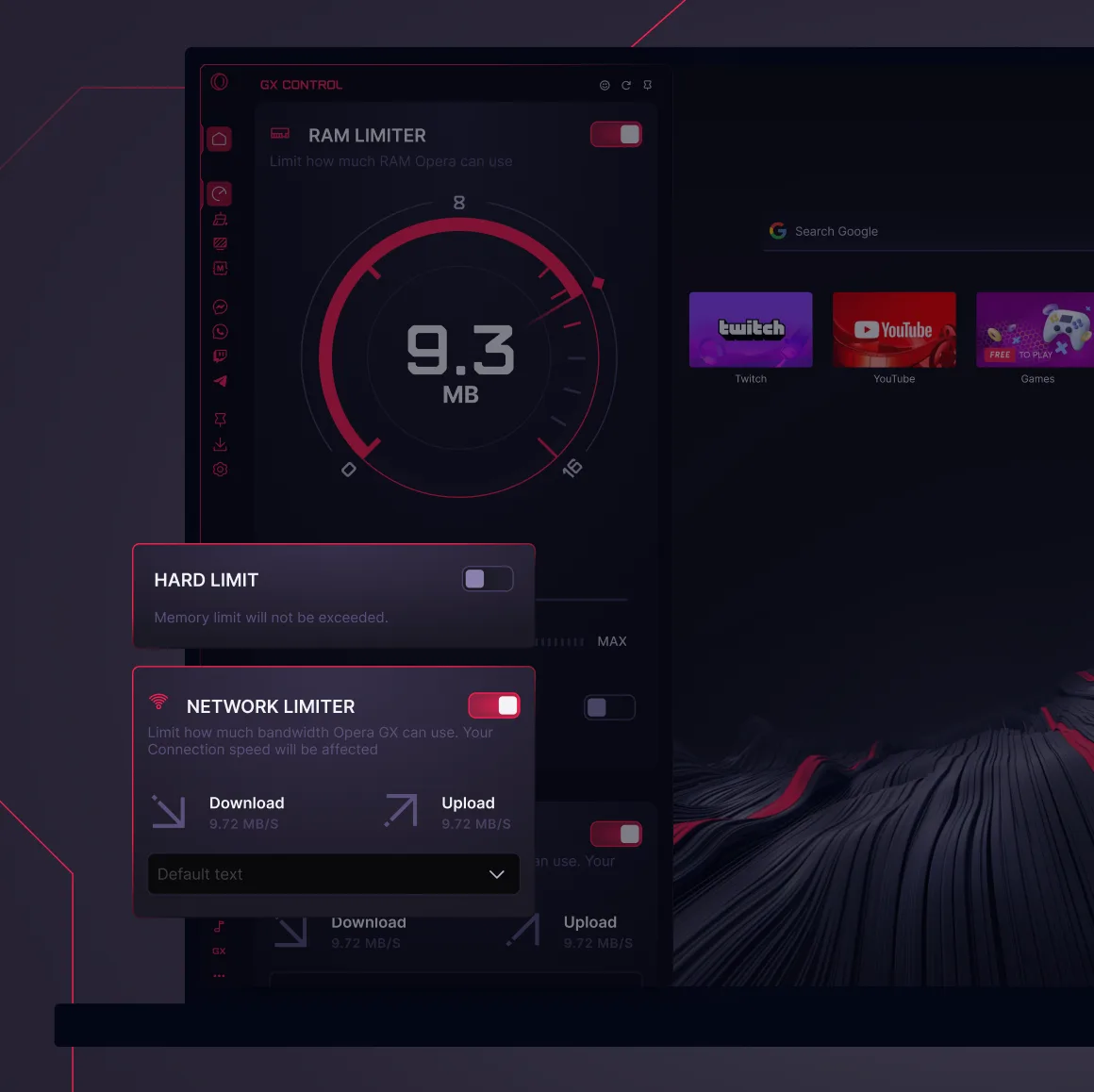
Opera's network limiter page says you turn it on in GX Control and choose a limit from the presets, in KB/s or MB/s. Its text describes a bandwidth cap; the separate download and upload caps appear only in Opera's image above. Opera frames the feature as a way to cut lag while gaming and streaming, publishes no ping figures, and we found no independent test.
The cap is browser-wide. How2Shout (2023) reports presets from 64KB/s to 25MB/s applied across everything the browser does. That logic shapes when it helps:
- It helps when what you want to protect runs outside the browser: OBS, the Discord app, a game launcher, a call app. Pick the preset closest to what that app needs, if one exists.
- It doesn't help a stream you're watching in a browser tab, which gets throttled too. Broadcasting from OBS is a different story, since OBS isn't in the browser.
Watch the units. Opera's presets are bytes; streaming figures are usually bits. Make Tech Easier gives 6 to 10Mbps for Full HD streaming, and 10Mbps is about 1.25MB/s (our arithmetic). On a fast home connection, a high preset may not change much.
A use that fits: you started a big file in a tab and a ranked match is about to begin. Cap the browser, play, then switch the cap off.
Hot Tabs Killer
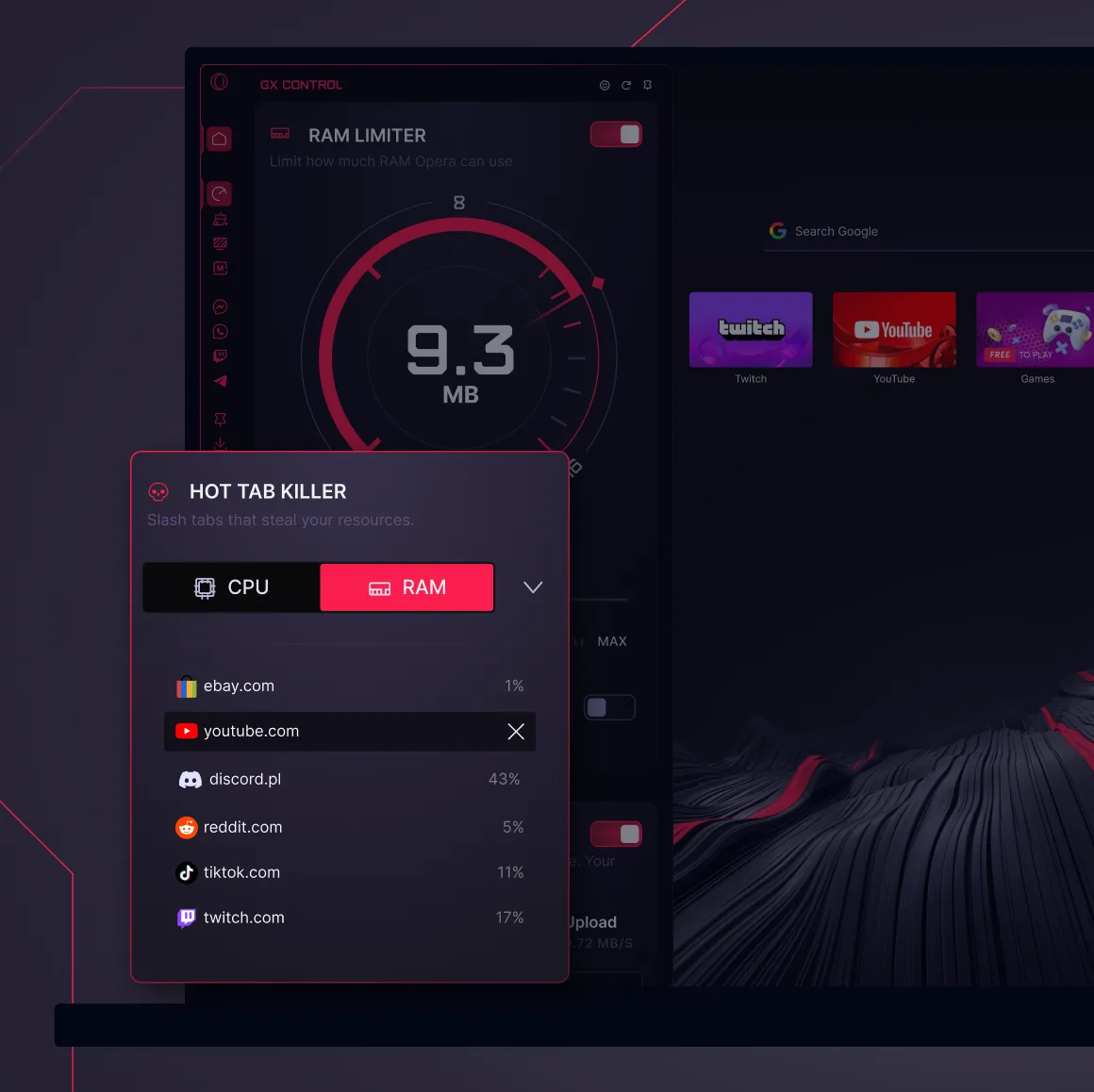
Opera says Hot Tabs Killer finds "the worst resource offenders" and closes them in one click. Guiding Tech (April 2024) lists it as a way to close unused tabs from the same panel.
It earns its place when the fans spin up, you can't tell which of 25 tabs is guilty and you'd rather not alt-tab into Task Manager mid-queue. It closes tabs, so look before you click if one holds unsaved work.
Opera GX Lag and High CPU Usage: Fixes in Order
Sometimes the limiter isn't the problem. GX is the thing at the top of your CPU graph. Opera's forum has a long thread of exactly these complaints, mostly from around 2021 and centered on Twitch and YouTube video, with no confirmed fix. The official pages support these steps, cheapest first:
- Find the culprit. In that thread, a volunteer moderator told users to "open Opera's internal task manager and check what is using that much CPU," and to check while the problem is happening. Guiding Tech puts it under Developer > Task Manager. It shows whether a tab, an extension or a video is to blame.
- Tidy up and update. Opera's FAQ lists closing unused tabs, removing unused extensions, clearing cache and cookies and updating the browser as ways to improve speed. Guiding Tech points to GX Cleaner for the cache and cookies.
- Turn off animated wallpapers. Opera's help says "Animated wallpapers can affect your system's performance. Disable this option if your system feels too slow." That page covers Opera in general; GX is built on the same browser, so treat it as relevant but not GX-specific.
- Toggle hardware acceleration. The Opera FAQ says to check graphics drivers and try enabling or disabling it at Settings > Browser > System, under "Use graphics acceleration when available." In the forum thread one user said turning it off helped somewhat and caused display problems, and the moderator noted that video decoding is CPU-heavy when the codec can't be hardware accelerated.
- Reinstall, last. The FAQ lists it as a final step.
Change one thing at a time. Change five and you won't know which one worked.
Settings Not Sticking?
If GX Control forgets your values, you're in company. In an Opera forum thread, one user wrote that "every single time" they open the browser they must set their parameters again, naming memory and CPU shaping. Another said their RAM limit (16GB) and CPU limit (100%) reset to maximum after restart; a third reported the same. One user said theirs was "working great." The thread has no dates, versions or posted fix.
Separately, How2Shout (2023) says limits reset when you close and reopen the browser. It may be a long-standing quirk or it may have been fixed since; we couldn't tell.
What to try, as suggestions: update the browser, set the limits again and restart to check. Treat the limiters as a per-session switch you set when you sit down to play. And send feedback to Opera if it still resets, as one user in the thread said they did.
Opera GX Settings to Start From: Three Setups
Use the table above for the numbers. These are the shapes, not the figures.
- 8GB laptop: the low end of the table, CPU at 50%, a short tab list, hard limit off unless a game still hitches. The network limiter only for downloads.
- 16GB desktop, streaming: the middle row while you play, CPU at 50%, and a network cap that leaves OBS and Discord alone. Check Hot Tabs Killer between matches.
- 32GB rig: you have room, so a gaming cap well under Opera's 50 to 60% is plenty for most browsing. Opera's figure only makes sense if you work in the browser. Leave the CPU limiter at 50% for play and off for work.
What We Couldn't Verify
- Frame-rate or ping gains. Nobody we found measured GX Control against games. Opera and PCWorld describe benefits; neither publishes numbers.
- The best cap. The values above come from sources and our judgment, not from a measured optimum.
- Current slider steps. Sources from 2022 to 2025 disagree, and we haven't used the current build.
- Whether the reset bug is fixed. The forum thread is undated and How2Shout's report is from 2023.
- GX-specific lag fixes. The FAQ and wallpaper pages describe Opera generally, and the CPU thread is from about 2021.
Get Opera GX free from Opera's site if you want to try it. The costs, per our review, are ad-personalization data, closed code and its ownership. Setup takes about ten minutes, which is our estimate.
FAQ
How do I open GX Control in Opera GX?
Click the speedometer icon in the left sidebar. If you don't see it, click the three-dot icon at the bottom of the sidebar and choose GX Control. If the whole sidebar is hidden, open Easy setup in the top-right corner and turn on Show sidebar.
What does the Opera GX RAM limiter do?
It caps how much memory the browser can use. Opera says you can set hard limits or fine-tune the amount. On our reading of Opera's pages, it limits the browser only, not your game, and we found no independent test showing a frame-rate gain.
How do I make Opera GX use less RAM?
Turn on the RAM limiter in GX Control and lower the slider. Opera's FAQ suggests about 50 to 60% of available RAM on a mid-tier system, while other guides suggest 25% or 2 to 4GB for gaming. Closing unused tabs and removing extensions helps too, per Opera's FAQ.
What is the best Opera GX RAM limit?
Nobody has published a measured best number. Opera's FAQ suggests roughly 50 to 60% of available RAM on a mid-tier system, while PCWorld suggests 2 to 4GB. Our starting caps while gaming are 2 to 3GB on 8GB, 4GB on 16GB and 4 to 6GB on 32GB, as a suggestion.
Does Opera GX use less RAM?
We don't know. Opera says its limiter lets you set a memory ceiling, but we found no independent, quantified comparison with Chrome or any other browser. The LaptopMag benchmarks in our review reported no RAM figures either. What Opera offers is a limiter you set yourself.
Should I turn on the hard limit?
Our suggestion is to leave it off. Opera says it drops non-active tabs from memory immediately, and Make Tech Easier warns it might cause more browser performance problems. Try it for a single gaming session if the game still hitches and you don't mind tabs reloading.
Why is Opera GX lagging or using so much CPU?
Opera's help pages and forum point to video playback, extensions, animated wallpapers and hardware acceleration settings. Open Opera's task manager while it happens to see what's responsible, then work through the fixes above one at a time.
Does the Opera GX network limiter lower ping?
Opera says it keeps downloads from wrecking your ping mid-match, but its network limiter page publishes no ping figures. The cap applies to the whole browser, so it's most useful for protecting an app that runs outside it, like OBS or Discord.
 Reviews
Is Opera GX Better Than Chrome? Gamer's Verdict (2026)
Is Opera GX better than Chrome? For a gamer who keeps a browser open beside a game, its built-in RAM, CPU and network caps are the main difference on paper. For everything else, Chrome holds its ground. Here is what the tests do and don't show, and how to switch in 10 minutes.
 Reviews
Is Opera GX Safe? Opera GX Review (2026)
Is Opera GX safe? The official browser isn't malware. The real risks are fake installers, ad-personalization data and Chinese majority ownership. Here is what's sourced, what real users say, and whether GX Control is worth switching for.
 Guides
Games Like Rise of Kingdoms on PC: 8 Picks (2026)
Eight alternatives to Rise of Kingdoms you can play on a PC, from mobile-style alliance wars to two full 4X strategy games. Each entry covers the PC route, what it shares with RoK, how it makes money, and who it's for.